
A DeFi wallet can have no active connections to decentralized applications and still contain permissions allowing external smart contracts to transfer its tokens.
Those permissions are called token approvals. They are created when you authorize an application to spend assets such as USDC, UNI, or another ERC-20 token.
Some approvals authorize a specific amount. Others grant practically unlimited spending access, potentially exposing tokens deposited into the wallet months after the original interaction.
You can inspect existing permissions without paying gas or revealing your recovery phrase. Removing an on-chain approval requires a transaction, but it normally doesn’t require transferring the tokens themselves.
Here’s how to check your wallet and remove permissions you no longer need.
What Are Token Approvals and Allowances?
Token approvals allow a designated address, commonly a smart contract, to transfer tokens on behalf of the wallet owner.
For standard ERC-20 tokens, the permission is stored in the token contract.
It identifies the token owner, the authorized spender, and the permitted spending amount.
Suppose you want to swap 200 USDC for ETH.
The decentralized exchange may first request permission to spend 200 USDC through its router or another designated contract.
Once approved, that spender can initiate token transfers within the allowed amount, subject to the contract’s rules.
The allowance remains in place until it is consumed, changed, or revoked.
An approval doesn’t immediately move tokens. It creates authorization that can be used in a later transaction.
Limited vs Unlimited Token Approvals
| Permission | Spending Limit | Potential Exposure |
|---|---|---|
| Limited approval | 100 USDC | Up to the remaining 100 USDC allowance |
| Larger approval | 5,000 USDC | Up to the remaining 5,000 USDC allowance |
| Unlimited approval | Extremely large amount | Potentially the entire available token balance |
| Revoked approval | Zero | No spending through that ERC-20 allowance |
These limits apply to the specific token and spender relationship, not automatically to every asset in the wallet.
For NFT collections, operator approvals work differently and may authorize transfers of multiple NFTs.
Why Unlimited Token Approvals Can Be Dangerous
Many DeFi interfaces request unlimited allowances to reduce repeated approval transactions.
This improves convenience but creates long-lived permissions.
If a spender contract becomes compromised or turns out to be malicious, it may use its existing authorization to transfer tokens without requesting another approval from the wallet owner.
Consider an account with 10,000 USDC.
| Scenario | USDC Balance | Authorized Allowance | Maximum Potential Exposure |
|---|---|---|---|
| Limited permission | 10,000 | 200 USDC | 200 USDC |
| Broad permission | 10,000 | 5,000 USDC | 5,000 USDC |
| Unlimited permission | 10,000 | Effectively unlimited | 10,000 USDC |
The exposure is limited by the available balance, remaining allowance, and applicable contract behavior.
An unlimited approval can also affect future deposits. If you withdraw all your USDC and later receive another 10,000 USDC, the old permission may still authorize spending those tokens.
That persistence is the main reason to review unused allowances.
Token Approval vs Wallet Connection vs Signature
These three actions are frequently confused.
| Action | What It Does | Requires Gas? |
|---|---|---|
| Connect wallet | Allows an application to interact with your wallet interface | Usually no |
| Sign a login message | Proves control of an address for authentication | Usually no |
| Approve ERC-20 spending | Creates or updates an on-chain token allowance | Yes, for standard approvals |
| Sign a Permit authorization | May authorize token spending through an off-chain signature | Usually no at signing |
| Revoke on-chain approval | Removes or reduces an existing allowance | Yes |
Disconnecting a website does not revoke approvals stored in a token contract.
Likewise, not every signature is harmless.
EIP-2612 Permit signatures and Permit2 authorizations can grant spending permissions without a conventional approval transaction.
A regular login signature usually doesn’t authorize spending, but users must inspect what they are signing rather than relying on a wallet popup’s appearance.
How to Check Token Allowances in Your Wallet
One convenient way to inspect existing permissions is through Revoke.cash.
The service supports Ethereum and numerous other EVM-compatible networks.
Step 1: Open the Official Revoke.cash Website
Navigate to:
You can enter your public wallet address to inspect approvals without connecting your wallet.
Alternatively, connect a supported wallet if you intend to revoke permissions.
Only use the official website. Fake approval-checker websites are a common phishing risk.
Step 2: Select the Correct Blockchain
Approvals are network-specific.
An approval recorded on Ethereum Mainnet is separate from one on Base, Arbitrum, or another network.
Select the blockchain where you previously interacted with the decentralized application.
If your wallet uses several networks, review them separately.
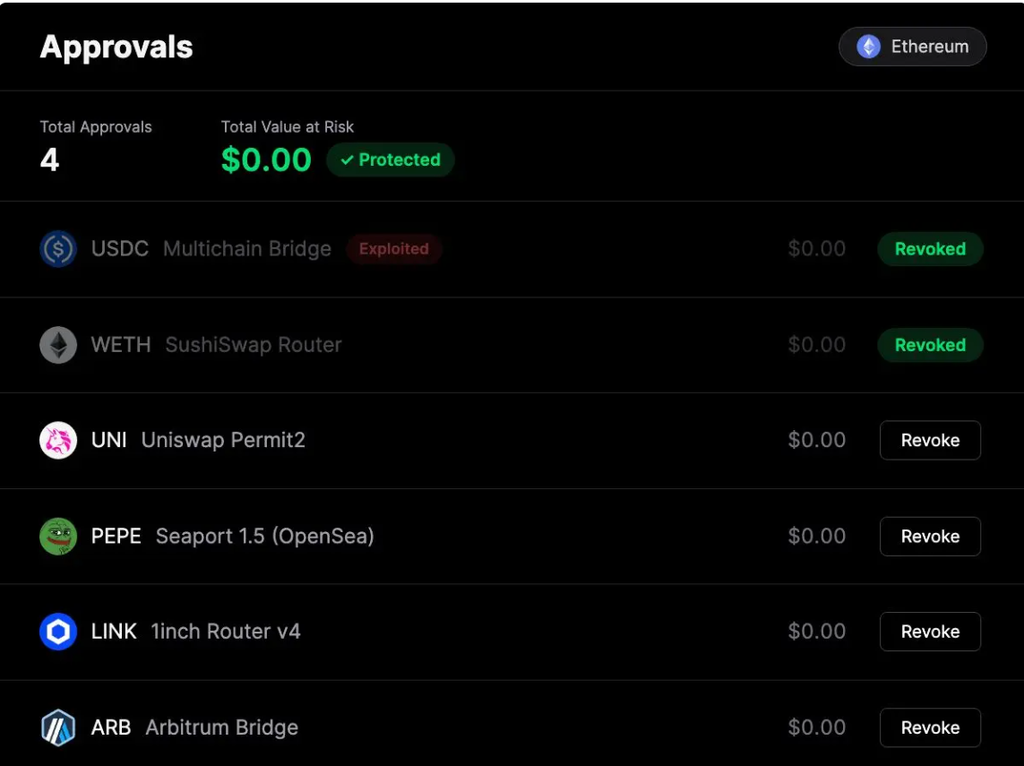
Step 3: Review the Approval List
The dashboard displays detected permissions, including information such as:
- Token contract.
- Approved spender.
- Allowance amount.
- Permission date or related activity.
- Available revoke action.
Look for unlimited allowances and spender addresses associated with applications you no longer use.
A contract you don’t recognize isn’t automatically malicious. Verify its address and transaction history before drawing conclusions.
How to Revoke Token Approvals Using Revoke.cash
Once you’ve identified an unnecessary permission, removing it is usually straightforward.
Step 1: Connect the Wallet
Connect the wallet that originally granted the approval.
Ensure the selected network matches the blockchain containing that permission.
You must control the relevant wallet address to submit the revocation transaction.
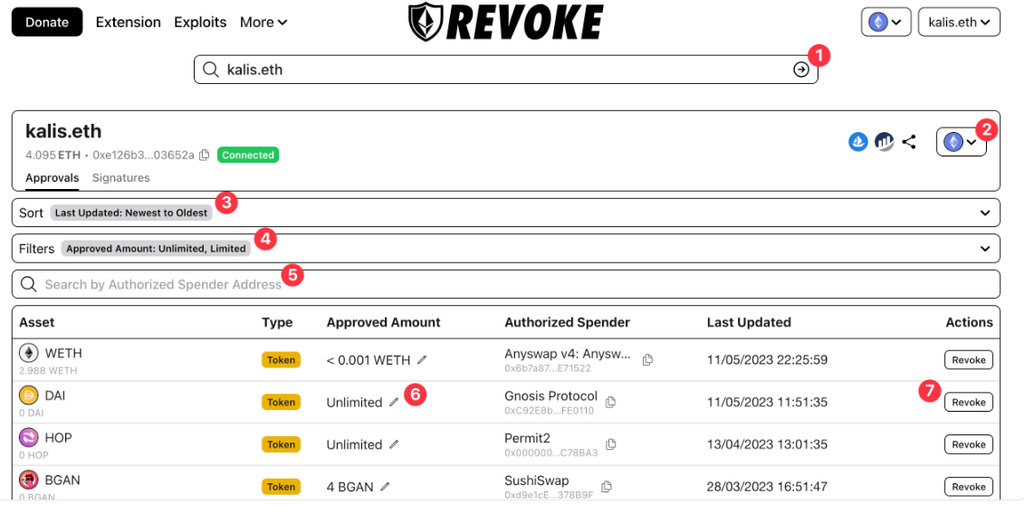
Step 2: Select the Approval
Find the token and spender you want to remove.
Double-check both addresses, particularly if several applications use the same token.
For an ERC-20 allowance, the revoke action generally updates the authorized amount to zero.
The underlying token contract operation is:
approve(spender, 0)
For NFT collection-wide operator permissions, the equivalent operation typically changes the approval status to false.
Step 3: Review the Wallet Transaction
Select the revoke action and inspect the transaction in your wallet.
Confirm the correct blockchain, contract interaction, and estimated network fee.
Some wallets may display the word “Approve” because granting and revoking ERC-20 allowances use the same contract function.
The important detail is that the new authorized amount is zero.
Never sign a new unlimited spending approval presented as a mandatory step to remove an old one.
Step 4: Confirm and Verify
Submit the transaction.
After blockchain confirmation, refresh the approval dashboard.
The relevant allowance should be zero, or the NFT operator authorization should be disabled.
Revoke.cash’s standard individual revocation tools are free to use apart from blockchain gas fees. Optional batch features may have additional service charges.
How to Revoke Smart Contract Permissions on Etherscan
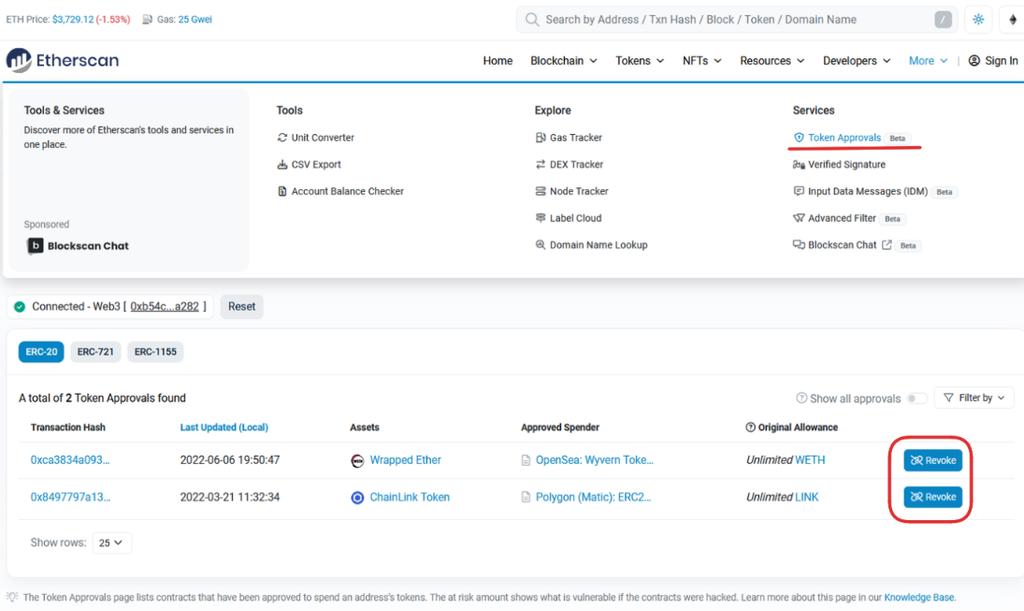
Etherscan provides another way to inspect and revoke permissions on Ethereum.
Open:
https://etherscan.io/tokenapprovalchecker
Enter your public Ethereum address.
Choose the relevant token standard: ERC-20, ERC-721, or ERC-1155.
Review the spender information and authorized permissions. Enable the option to display all approvals if needed.
For a permission you want to remove, select Revoke, connect your wallet through the supported interface, and confirm the transaction.
Once confirmed, refresh the checker and verify that the authorization has been removed.
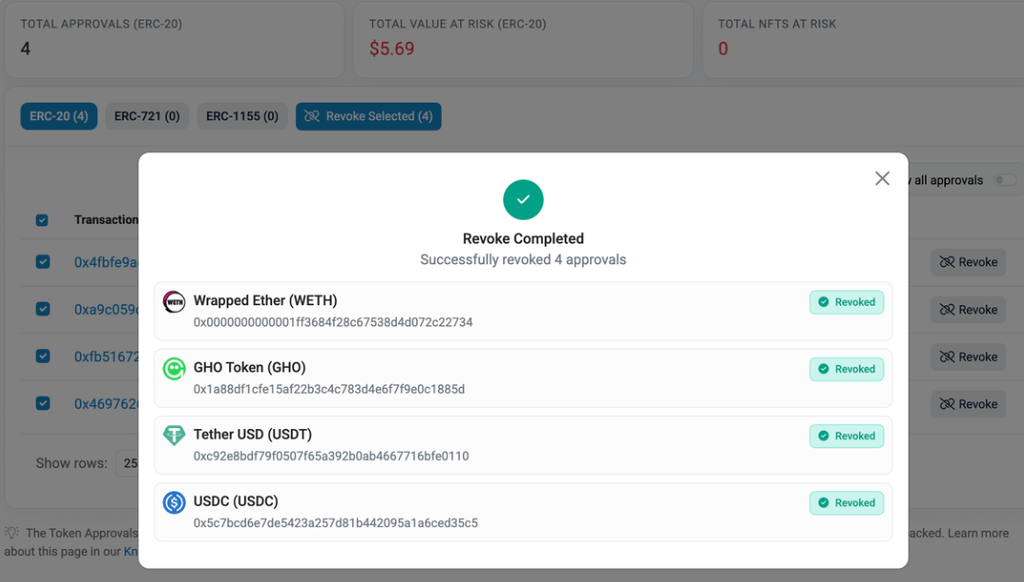
For other blockchains, use a compatible explorer for that network or an approval-management service supporting it.
How Much Does It Cost to Revoke Token Approvals?
Checking token allowances is generally free.
An on-chain revocation changes blockchain state, so the transaction requires gas.
On Ethereum Mainnet, the transaction fee depends on gas used and the effective gas price.
Transaction Fee = Gas Used × Gas Price
Suppose a revocation consumes 45,000 gas units.
Illustrative Ethereum Revocation Costs
| Gas Price | Gas Used | Fee in ETH |
|---|---|---|
| 2 gwei | 45,000 | 0.00009 ETH |
| 5 gwei | 45,000 | 0.000225 ETH |
| 10 gwei | 45,000 | 0.00045 ETH |
| 20 gwei | 45,000 | 0.00090 ETH |
At a hypothetical ETH price of $3,000, a transaction costing 0.000225 ETH would equal approximately $0.68.
These are mathematical examples, not live gas quotations.
Actual gas usage depends on the token contract and revocation method. Other EVM networks have different fee structures, and some tools charge separately for optional batch operations.
If you need to remove several permissions, compare the cost against the risk of leaving each authorization active.
Which Token Approvals Should You Revoke First?
Not every unlimited allowance is evidence of a compromised wallet.
A well-established DeFi protocol may use broad permissions for legitimate operations.
However, some approvals deserve more immediate attention.
Token Approval Risk Checklist
| Permission Type | Main Concern | Suggested Action |
|---|---|---|
| Unknown unlimited spender | Potential unauthorized token transfers | Verify and prioritize removal |
| Contract linked to a known exploit | Existing spending authority may be dangerous | Revoke promptly if safe |
| Old unused application | Unnecessary ongoing exposure | Revoke |
| Active protocol with limited allowance | Spending remains authorized | Review whether needed |
| Unlimited NFT operator | Multiple NFTs may be exposed | Check operator and revoke if unnecessary |
| Permit2 permissions | Multiple layers of spending authorization | Inspect underlying and delegated permissions |
Risk classifications are qualitative. They don’t represent measured probabilities of loss.
Revoking permissions is generally a trade-off between convenience and security.
Some applications will require a new approval before you can use them again.
What About Permit2 and Off-Chain Signatures?
Not every token authorization appears as a conventional ERC-20 allowance.
Permit2 allows supported applications to manage more flexible spending permissions through a separate contract.
There are potentially two authorization layers:
- The ERC-20 approval granted to the Permit2 contract.
- The individual spending permissions managed through Permit2.
Removing a token’s allowance to Permit2 can block spending through that allowance, while delegated Permit2 permissions may need separate review.
Certain signature-based authorizations expire automatically. Others can remain valid until a deadline or nonce invalidation.
A signed EIP-2612 Permit message may not be visible on-chain until it is used.
Because off-chain signatures aren’t necessarily published, approval scanners cannot provide a complete inventory of every signature a wallet owner has created.
Some supported signature types can be invalidated through dedicated cancellation tools, but the appropriate method depends on the signature system.
This is why reviewing allowances and reviewing signed authorizations are related but different security tasks.
Does Revoking Approvals Protect an Already Compromised Wallet?
Revocation can stop future transfers through a specific allowance once the transaction is confirmed.
It cannot reverse completed transfers or guarantee protection against transactions an attacker has already submitted.
More importantly, if someone controls your private key or recovery phrase, they may create new approvals or transfer assets directly.
In that situation, revoking allowances is not sufficient.
Any remaining assets should be secured in a newly created, uncompromised wallet through carefully verified transactions.
Never provide a recovery phrase to an approval checker, wallet recovery website, or support representative.
Also remember that a hardware wallet cannot prevent misuse of an approval you knowingly signed. Hardware wallets protect private keys but don’t automatically make every authorized smart contract safe.
Common Mistakes When Removing Unlimited Token Approvals
Several mistakes can undermine an otherwise straightforward wallet security check.
One is confusing disconnecting a decentralized application with removing its on-chain spending authorization.
Another is checking only Ethereum while forgetting permissions granted on Layer 2 networks.
Users may also revoke the wrong spender because they rely on token symbols rather than verified contract addresses.
Finally, an approval checker showing no detected permissions does not guarantee that every possible signature-based or nonstandard authorization has been canceled.
The safest approach is to review transaction details carefully and verify the result after every revocation.
Frequently Asked Questions
Is it safe to revoke token approvals?
Generally, yes. Revoking an unnecessary allowance removes spending authorization rather than transferring the approved tokens. Always verify the transaction before signing.
Does Revoke.cash need my seed phrase?
No. A public address is sufficient to inspect supported approvals. Revoking permissions requires signing a transaction with your wallet, never sharing your recovery phrase.
Can I revoke unlimited token approvals?
Yes. Standard ERC-20 allowances can generally be reduced to zero through an on-chain transaction.
Does revoking an approval affect staked or deposited funds?
Usually, revoking a wallet’s spending allowance does not remove funds already deposited in a protocol. Future deposits or certain application interactions may require another approval.
Is disconnecting my wallet the same as revoking approvals?
No. Disconnecting removes an application’s wallet connection, while the on-chain allowance remains until changed or revoked.
Does revoking token permissions cost gas?
Yes, standard on-chain revocations require gas. The amount depends on the network, transaction complexity, and prevailing fees.
Can I cancel a malicious Permit signature?
Some Permit signatures can be invalidated using the relevant nonce or cancellation mechanism. The available method depends on the signature standard, and cancellation may be ineffective if an attacker has already used it.
How often should I check token allowances?
Review approvals after interacting with unfamiliar applications, following relevant security incidents, and periodically when maintaining an active DeFi wallet.